SLF is a TradingView indicator that maps market structure and liquidity, grades setups, and plots levels you can review before taking a trade.
No jargon, no complex setups. If you can read green vs. red, you can use SLF.
Gold, forex, indices, crypto, stocks — anything TradingView charts.
Signals and structure breaks ping your phone the second they print.
One click on TradingView. Tuned out of the box — press play and trade.
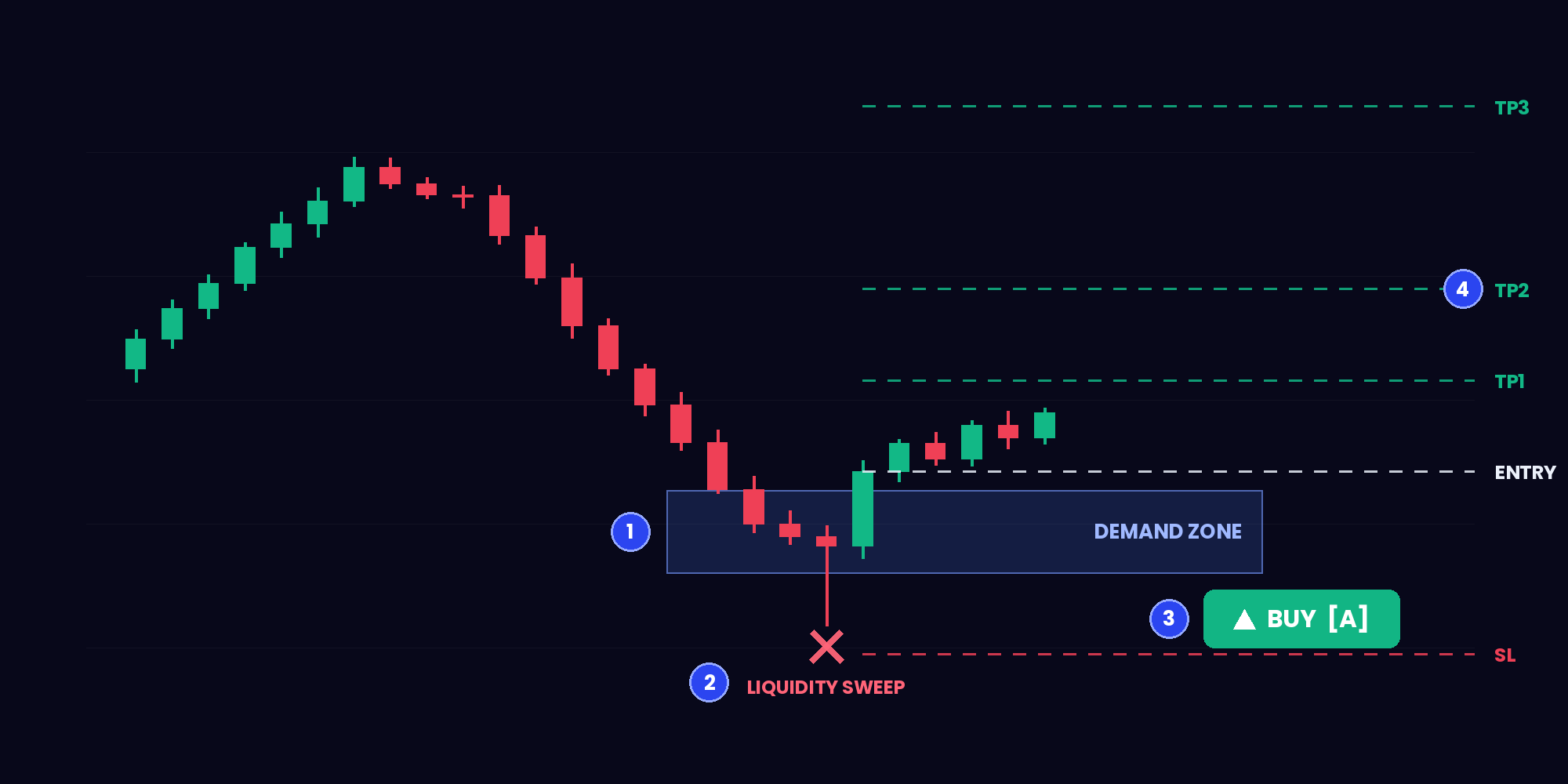
One setup, start to finish — everything on this chart is drawn by SLF automatically.
SLF marks where big money is waiting to buy — before price gets there.
The stop-hunt that traps retail, flagged the moment it happens.
BUY with a grade — printed only when the setup confirms.
TP1 / TP2 / TP3 and stop loss, drawn straight on the chart.
One overlay, two engines — the chart engine paints what institutions watch, the signal engine tells you what to do about it.
Market structure, institutional order blocks, fair value gaps, premium/discount zones and liquidity levels — detected live and drawn clean, on any market and timeframe. The concepts smart-money courses charge thousands to teach, automated.
Every setup is scored on five confluences — liquidity sweep, session timing, zone quality, rejection strength, freshness. Only A and B grades print, with the full trade plan attached. The C-grade noise never reaches you.
Stop scanning 40 pairs. SLF watches the chart around the clock and alerts you when a graded setup prints.
Every signal ships with entry, three targets and a stop. You know the exit before you ever enter.
The grading engine kills low-quality setups before they reach your screen. Fewer trades, better trades.
The dashboard shows bias, setup status and grade instantly — on any timeframe you open.
Monthly, quarterly or annual — checkout takes two minutes.
Send us your TradingView username. We add you to the private list and SLF appears in your Invite-only scripts.
Add SLF to any chart, turn on alerts, wait for A-setups and follow the printed levels.
Every plan includes the full TradingView indicator. Choose your billing period on Whop.
Questions about access or billing? Contact @jrtradessupport on Telegram.
See how SLF marks signals, targets, and stops on TradingView charts.
Yes. The indicator labels each graded setup with its direction, entry, three targets, and stop level so you can review them on the chart.
Anything TradingView charts — gold, forex, indices, crypto, stocks. The signal engine runs on one locked strategy timeframe, so signals don't change when you flip chart timeframes.
No. Signals are computed on closed candles from a fixed strategy timeframe. A signal that prints, stays — the history you scroll back through is the history that happened.
A free TradingView account. We add your username to the private invite list and SLF appears in your Invite-only scripts — one click to add it to any chart.
Access is granted the same day, usually within a couple of hours of sending your TradingView username. You'll get a setup walkthrough with it.
Yes. Plans renew automatically, and you can cancel or switch tiers whenever you like — you keep access until the end of your billing period.
No and no. SLF is an analysis tool — it shows you what price is doing; it doesn't trade for you, and no tool can promise outcomes. Trading involves real risk. Never trade money you can't afford to lose.
The next session's setups are coming — with or without you seeing them.